Introduction
Futurelook is Vikingen’s proprietary modeling language. All models in Vikingen are coded in this language, and you can create your own models in Vikingen using Futurelook. The term “model” refers to a diagram.
Anyone who has programmed in C++, C#, Java, Pascal, Basic, or similar programming languages will quickly get the hang of how to develop their own analysis model in Vikingen using Futurelook.
In the function editor, you can create new functions and edit the source code of existing models. Once you have built your analysis model, you need to configure the appearance of charts, tables, and configuration boxes.
This makes Futurelook a highly flexible and powerful tool for developing unique analytical methods for financial markets.
This online guide is intended as an introduction to the Futurelook programming language for users with no prior programming experience. We will cover all the necessary concepts and structure the guide around a variety of examples to make learning easier for beginners. The guide is divided into three different sections:
Episodes 1 and 2: An introduction to Futurelook and its components, plus a first look at programming
Sections 3, 4, 5: Informative sections on the programming language and a description of the available tools
Episodes 6, 7, and 8: Futurelook in Practice—how to use the program to take an idea and turn it into a complete, professional model.
Introduction to Futurelook
FutureLook is a very powerful tool for financial analysts and investors. With FutureLook, it is easy to create your own algorithms for performing complex time-series analysis and technical analysis. FutureLook is designed as a simple programming language, with a customized function library suitable for analyzing financial time series. FutureLook is integrated with Vikingen and linked to the Profit Generator, making it easy to backtest algorithms.
[image of the “Modules” menu]
On the surface, FutureLook consists of a few files stored in Vikingen. These are Models and Presentations, respectively.
Introduction to Futurelook – The Function Editor
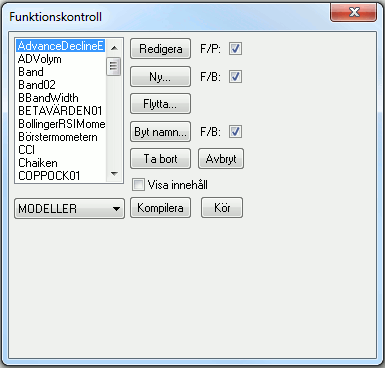
The Function Editor is the tool you use to program your Model. By launching the Function Editor (’Modules’—> ’Function Editor’), you can browse the existing function library in your Viking and create new libraries or functions. The Function Editor is a simple text window used to edit and create your own models, compile them, and write help texts. You can access the Function Editor either by creating a “New” model or by “editing” an existing one.
Tip: If you click “View Content,” you can see a preview of the features, which can be helpful if you’re looking for a piece of code to reuse.
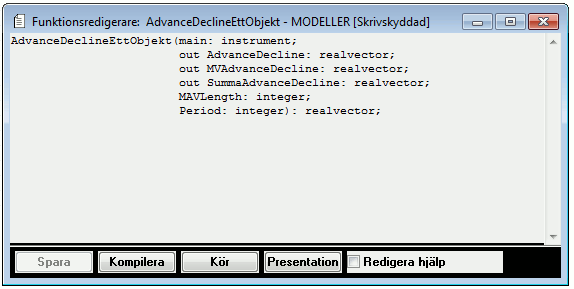
In addition to the text field itself, the function editor has buttons to “Save” the function after making changes and to “Compile” the code to make the function executable in Vikingen. You can also use the “Run” button to quickly launch the function with default settings to verify that the code works as intended. Finally, there is a “Presentation” button that takes you to the “Presentation Editor” to configure the graphical settings for the model. The Function Editor has two modes; “Edit Help” can be used to edit the help file instead of the program code.
Introduction to Futurelook – The Presentation Editor
When you open the “Analyst” in Vikingen and select a model, you are actually selecting a presentation. This presentation contains information about which model is being used, how it should be presented, and what settings should be applied. This allows you to have multiple separate presentations that use the same underlying models. In addition to its function as an “interface,” the Presentation Model also contains information about the appearance of the chart or table, as well as the settings the user can adjust—such as changing the time interval, colors, or switching to a logarithmic scale. The presentation also includes help information, as well as specifications for how the output should be handled in the model table.
The Basics of Futurelook
Program Structure, Design
Par(); |
Parameters: Handling of input and output data. Define which input data should be used in the function, as well as which data series should be available for extraction from the model. | |
Where |
Variables: Define which variables are to be used locally in the program, but not as output. | |
Start & End; |
The start and end of the actual program code. Here, you can only use objects defined in the segments above and call functions found in the Viking function library. |
Comments
Different programming languages use different characters to signal to the compiler that what is written is not program code that it understands, but is intended for the programmer. Text explaining why commented code is important: Futurelook uses the character combination // to indicate that everything on the same line is a comment, and (* and *) to indicate that everything written between those characters is a comment.
In other words:
// This is a comment!

(* This is a comment that spans multiple lines! *)
A First Look at: Parameters
The first segment of each function in Futurelook is the definition of the parameters. Here, you specify how Vikingen should handle input data (one or more objects), what output data should be available from the function (e.g., in a model table), and which parameters should be available in the model settings (number of periods for MAV, etc.). In general terms, the parameter segment should look like this:
pair( [flag] identifier : data type ; [flag2] identifier2 : data type2 ; .. ) : [return type] ;
Where [flag] is a specification for how Futurelook should handle the data:
out : |
The data can be used as output, for example, as a graph in the chart or as a column in the model table. |
|
was: |
The data is used as a variable, just as if it had been defined under the “var” segment instead of the “par” segment. The difference is that if you define it under the “par” segment with the “var” flag, it is visible in the presentation editor and can therefore be retrieved later if desired. |
|
: |
The absence of a flag means that the data is something that should be included in the model (think of it as the opposite of “out”). |
|
:return type |
By specifying a data type after the colon (:) following the closing parenthesis, you define what the function will return. This is used when calling the function from within another function, and requires that you end the program by defining ‘return [identifier];’ before the final ‘end;’ line. |
For example, `out utvektor1 : realvector;` means that `utvektor1` is the name of a vector whose elements are of type `real`, and that this vector is to be output from the model so that it can be used graphically or in the model table.
A First Look at: Variables
Variables are data that you want to use within the function, but that do not need to be—or should not be—used outside of it. This can include data of type integer—that is, whole numbers used as counters in a loop—or vectors used while the function is running, but which do not need to be used as output. In terms of syntax, the `var` segment is somewhat simpler than the `par` segment and looks like this:
where identifier : data type ; ..
Note that the `var` segment does not end with any special character or word; rather, all declarations using the syntax shown above that appear after `var` and before `begin` become declared variables in the program.
A First Look at: Features
All functions in the Viking function library can be called in your functions using the following syntax:
[library_name].[function_name](parameter1, parameter2, ...);
For example, you can call the function “MAVN,” which is located in the “Std” function library, using the following call:
std.MAVN(a,b);
We know that MAVN calculates a natural average of a data series ‘a’ of the real vector type over the last ‘b’ periods. If we want a 20-period average of the main object’s closing price, we write:
std.MAVN(main.close, 20);
A First Look at: Operators
Many of the expressions used in Futurelook will contain operators. An operator is a symbol that represents one of a variety of things, such as a mathematical operation or a comparison between two things. Operators require two parameters to work with and will return a value after the operation is performed.
For example, you can calculate the index price of the S&P 500 in SEK by multiplying a vector `sp500`, consisting of the index, by a vector `sekusd`, consisting of the krona exchange rate.
SP500SEK := sp500 * sekusd;
The operator in this case is multiplication *. Futurelook knows that both sp500 and sekusd are vectors and ensures that the result of the operation is also a vector. This makes it possible to display SP500Sek on the screen exactly as desired.
A First Look at: A Sample Program
We’ve now gotten a first look at the various components that make up a program in Futurelook, so we can start thinking about the big picture: What does a complete model look like?
For example, we’ll write a model that calculates two different moving averages of a stock’s closing prices and a moving average of the trading volume for that same stock.
par(main : instrument; out MV1, MV2, MVVol : realvector; MAV1Length, MAV2Length, MAVVolLength : integer); var filledclose : realvector; begin filledclose
We’ll break down the code to examine all its parts based on what we’ve learned in this section.
par(main : instrument;
The first parameter defined is an object of type “instrument,” which we call “main.” In a typical model, this line will always be present, since we want the model to run on the “Current Object” in Vikingen.
out MV1, MV2, MVVol : realvector;
We also define three vectors that we want to be able to represent as decimal numbers—i.e., real vectors—and we want to be able to see them in the chart, so we specify the prefix “out” for them.
MAV1Length, MAV2Length, MAVVolLength : integer);
The model uses three parameters that determine how it works: the three different periods for the moving averages. By not specifying them as “out,” we are indirectly stating that the model requires these three as input parameters. Don’t forget that the last line under the “par” segment must end with );
where filledclose : realvector;
In the “var” segment, we define a vector that we want to be able to contain decimal numbers—that is, a real vector. By defining it in the “var” segment, we cannot plot the vector on the chart; instead, we use it only within the model.
beginning
Everything written between “begin” and the last “end” is the actual code for what the model should do
filledclose := std.FILL(main.close);
First, we use the standard FILL function to populate the vector `filledclose` with all the closing prices contained in the object `main`, and also to fill in any gaps in the vector if data is missing.
MV1 := std.MAVN(filledclose, MAV1Length);
We then assign the moving average of filledclose, with a period length of MAV1Length, to the vector MV1
MV2 := std.MAVN(filledclose, MAV2Length);
In addition, we assign the vector MV2 the moving average of filledclose with the second period length MAV2Length
MVVol := std.MAVN(main.vol, MAVVOLLength);
and finally, we assign values to the vector MVVOL that correspond to the moving average of the object’s volume vector, main.vol.


